


IT cost allocation sounds simple…until you try to explain why one department’s bill is double another’s.
Behind every fair, auditable IT budget is a methodical process: tracing costs from the general ledger through cost pools, assigning allocation drivers, and calculating a service rate that makes sense to both Finance and the business.
This guide breaks down that process step by step, from raw inputs to validated rates, so you can move from spreadsheet chaos to structured IT Financial Management (ITFM).
Quick answer
IT cost allocation is the process of assigning technology costs to the business services or units that consume them.
It typically follows this flow:
General Ledger (GL) → Cost Pools → Allocation Drivers → Service Rate → Service Catalogue.
Each step adds structure and transparency:
-
GL holds your raw expenses.
-
Cost pools group those expenses by function or service area.
-
Drivers determine how those costs are distributed (e.g., by user count, tickets, or storage volume).
-
Service rate converts total costs into a per-unit charge that maps directly to your service catalogue.
In short: Cost allocation turns accounting data into business value.
1. Inputs: Start with the General Ledger
The General Ledger is where every IT expense originates; salaries, software, hardware, hosting, licenses and facilities. But GL data alone doesn’t tell you who consumed what.
Before allocating, cleanse and categorize your data:
Filter by IT-related accounts: Include all IT accounts to ensure full cost coverage.
Map GL accounts to cost types: e.g., labor, hardware, software, external services, facilities.
Normalize data: align naming conventions and currencies across entities or regions.
Serviceware Financial automates this integration by pulling costs directly from ERP or accounting systems, keeping one source of truth for allocation.
2. Building cost pools
A cost pool is a logical grouping of expenses that share a common purpose. It bridges raw accounting data and the service view of IT.
Typical IT cost pools include:
-
Compute / Storage / Network (infrastructure costs)
-
Applications (licenses, hosting, maintenance)
-
End-user Services (devices, support)
-
IT Management & Overhead (governance, PMO, architecture)
Each cost pool should answer one question: “What cost am I managing and why?”
Tip: start broad and refine over time. A simple hierarchy like this works well:
GL Accounts → Cost Pool → IT Tower→ Service
The goal is clarity. Every euro or dollar should trace back to a cost pool before it reaches a service.
3. Selecting allocation drivers
Allocation drivers distribute pooled costs based on measurable consumption. They’re the difference between arbitrary allocations and credible ones.
Good drivers have three traits:
-
Causality: they reflect actual usage or demand.
-
Availability: data is accessible and reliable.
-
Stability: changes should track real consumption, not noise.
Common IT cost allocation drivers
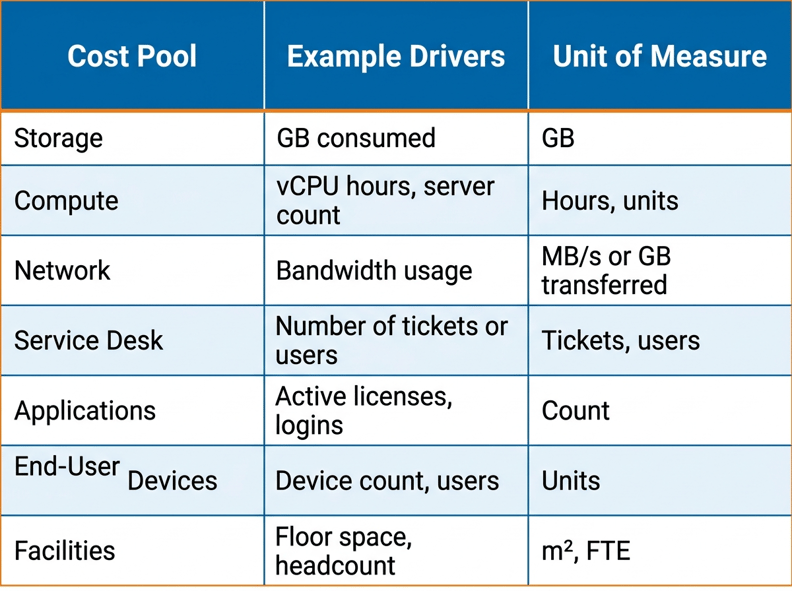
Combine direct (primary) cost assignments with indirect (secondary) allocations that flow through intermediate services.
4. Defining units of measure
Once you’ve chosen your drivers, define consistent units of measure (UoM). These are the “per” in every rate, per user, per GB, per device.
UoMs should align with how services appear in your service catalogue. For example:
-
The “Email Service” might have a unit of per mailbox per month.
-
“Cloud Hosting” could use per VM per hour.
-
“IT Support” might bill per active user per month.
Consistency in UoM makes reporting and benchmarking far easier later on, especially when using platforms like Serviceware Financial to automate rate calculation across services.
5. Calculating service rate
This is where cost meets consumption.
To calculate a service rate, divide the total allocated cost for a service by the total number of consumption units.
Formula:
Service Rate = Total Allocated Cost ÷ Total Units of Consumption
Example:
If total desktop support costs are €500,000 and there are 2,000 supported users,
500,000 ÷ 2,000 = €250 per user per year.
That €250 represents the unit cost for desktop support; the published service rate may differ once recovery rules or markups are applied.
Tips for realistic rate setting
-
Calculate rates monthly using actual costs and demand to maintain transparency and accuracy.
-
Distinguish between direct and indirect costs: assign direct costs (e.g., labor, software) immediately to services, and allocate indirects (like overhead or shared tools) through defined secondary cost flows.
-
Keep the math transparent; Finance will always ask “why €250?”
-
Run benchmark checks to ensure rates are market-aligned.
Serviceware’s ITFM software automates this full workflow, maintaining audit trails and enabling “what-if” simulations before rates go live.
6. Validation loop: checking and adjusting
The final step… and the one most often skipped…is validation. Before publishing rates or invoices, check:
-
Are allocations balanced (no cost gaps or double counts)?
-
Does the service rate look reasonable compared to last period or benchmarks?
-
Can business stakeholders understand and accept the results?
A practical validation loop looks like this:
-
Reconcile totals – allocated cost = total IT cost.
-
Review outliers – investigate large variances.
-
Align with Finance – confirm allocation mappings and calculation logic.
-
Collect feedback – test understanding with non-financial users.
-
Monitor drivers – adjustments should occur automatically in Financial, but the results need regular review.
Validation isn’t just QA; it’s a chance to build trust. When departments see how rates are derived, they stop treating IT as a black box.
Putting it all together: the flow
General Ledger → Cost Pools → Allocation Drivers → Units of Measure → Service Rate → Service Catalogue → Billing
Each step builds on the last.
GL: financial accuracy
Pools: cost organization
Drivers: fairness
Rates: transparency
Billing: accountability
It’s the backbone of ITFM; connecting the accounting world to the business view of IT.
Common pitfalls in IT cost allocation
1. Too much detail, too early
TBM already defines a standard set of cost pools — start with those before adding complexity.
2. Weak or missing drivers
“% headcount” allocations for everything erode credibility. Use actual consumption where possible.
3. Inconsistent data sources
Pulling from separate spreadsheets or systems creates drift.
4. Skipping validation
If Finance doesn’t buy into your logic, you’ll lose support fast.
5. No link to services
If costs don’t map to the service catalogue, you can’t show business value.
Why good allocation matters
Transparent allocation doesn’t just keep Finance happy — it enables better decisions:
- Benchmarking IT costs against peers or cloud alternatives.
-
Showing business units the cost of underused or duplicated services.
-
Supporting chargeback or showback rollouts.
-
Enabling investment discussions based on value, not guesswork.
When done right, allocation turns IT from a cost center into a service partner. Industry leaders are already applying these principles at scale. As highlighted in CIO’s analysis on Cloud Unit Economics, shifting focus from spend to value begins with transparent cost allocation and an accurate service rate.

Curious about cost recovery?
Read our guide on Showback vs Chargeback vs Hybrid to choose the right IT billing model for your organization.
Read nowContinuous improvement
Treat allocation as a cycle, not a project. As services evolve, update drivers and pools regularly. Many organizations run quarterly recalculations and annual rate reviews.
Platforms like Serviceware Financial simplify this by automating data imports, recalculations, and variance analysis, making it possible to keep allocation live rather than locked in spreadsheets.
The takeaways
IT cost allocation is the foundation of every mature ITFM practice. From the general ledger to cost pools and allocation drivers, each layer translates financial data into insight.
Do it once and it’s accounting.
Do it continuously and it becomes strategy.
If you’re ready to build that foundation, explore how Serviceware’s ITFM software can automate cost allocation, rate calculation, and validation end-to-end, or learn how to extend those rates into charging and billing for showback and chargeback models.
FAQs
1. What is IT cost allocation?
IT cost allocation is the process of assigning IT spend to the business units, services, or platforms that consume it. It turns general ledger data into transparent, explainable service rates that support better financial decisions.
2. Why is IT cost allocation important?
IT cost allocation improves transparency, supports fair budgeting, and helps leaders understand what drives IT spend. It also enables showback or chargeback without relying on arbitrary cost splits.
3. What’s the difference between IT cost allocation and chargeback?
Cost allocation defines how costs are calculated and assigned. Chargeback defines whether those costs are billed to the business. You can allocate costs without charging them, but chargeback requires a solid allocation model.
4. What are cost pools in IT cost allocation?
Cost pools group related IT expenses into logical categories, such as infrastructure, applications, end-user services, or IT management. They bridge raw accounting data and service-level costing.
5. What are allocation drivers?
Allocation drivers are measurable factors used to distribute costs fairly, such as user counts, tickets, storage consumed, or virtual machine hours. Effective drivers reflect real demand, are reliable, and remain stable over time.
6. How are IT service rates calculated?
Service rates are calculated by dividing the total allocated cost of a service by its total units of consumption. This makes IT costs predictable and usable for planning, showback, or chargeback.
7. How often should IT service rates be updated?
Many organizations calculate rates monthly using actual data but publish stable rates quarterly or annually. This balances accuracy with predictability and avoids unnecessary volatility.
8. Do you need a service catalogue for IT cost allocation?
Not initially. Organizations can start by allocating costs to towers, platforms, or business units. A service catalogue becomes important when you want consistent rates, benchmarking, or chargeback.


