


Quick answer
An IT budget planner is a planning layer that turns financial actuals and consumption signals into a governed, driver-based forecast. It can live in a structured template, but most enterprises move to a tool when cloud and SaaS volatility make spreadsheet planning too fragile. The right IT budget planner connects GL data, usage metrics, and unit rates into rolling forecasts your Finance partners can trust; from IT Budget Planning & Forecasting to full IT Financial Management.
Introduction
Most IT budgets break long before the year does. Not because teams don’t plan, but because the underlying cost base has become more volatile than the planning model. Public cloud spend continues to grow rapidly (Gartner forecasted $723.4B in public cloud end-user spending for 2025), and an overall IT spend is still rising (Gartner forecasted $5.61T in 2025, +9.8%).
This volatility shows up in the day-to-day: cloud usage fluctuates, SaaS licensing shifts, and demand changes monthly - while many budgeting processes still assume stability and rely on spreadsheet logic that is hard to govern. It’s not surprising that cost controls remain difficult. And where controls are weak, waste persists.
A modern IT budget planner fixes the problem by making the planning model explicit and defensible. It structures costs by services and category, ties spend to measurable demand drivers, and produces a month-by-month forecast that Finance can reconcile back to actuals. In mature organizations, the IT budget planner becomes the planning layer on top of IT Financial Management (ITFM): actuals, allocations, and unit rates feed rolling forecasts, scenario analysis, and decision-making.
This guide breaks down what a good IT budget planner includes, how to structure it, and how to use it to forecast accurately and eliminate waste.
What an IT budget planner does
An IT budget planner is the planning layer that turns financial actuals and consumption signals into a governed, driver-based forecast. At a minimum, it standardizes how IT plans and explains spend. At scale, it becomes the system that Finance trusts because it provides:
- A common structure for IT spend (categories, towers, and owners) categorizes and forecasts spend
- A link between cost and consumption (drivers like users, devices, tickets, TB, VM hours)
- Unit-rate logic that separates price changes from volume changes
- Rolling forecasts that update monthly or quarterly instead of freezing annually
- Finance-grade traceability (GL tie-out, approvals, versioning, and audit trails)
Done well, the planner becomes a single source of truth for run costs (OPEX), change initiatives, capital investments, and consumption-based services - without rebuilding the model every cycle.
A 6-step flow on how an IT budget planner works
A functional IT budget planner follows a predictable sequence:
1. Start with clean cost pools and services
Costs belong in structured pools (compute, storage, network, SaaS, labor, applications) and are mapped to services - not vague ‘IT overhead’ buckets. ,
2. Attach the right demand drivers
Each service needs a measurable driver (users, devices, identities, tickets, VM hours, TB stored, transactions). If you can’t measure the driver, you can’t forecast it.
3. Translate drivers into money using unit rates
Unit rates connect demand to costs (e.g., Euro/VM hour, Euro/user/month). This is where planning becomes explainable: what changed - price, volume, or mix? Here, your ITFM solution assists.
4. Forecast demand first; let the model calculate spend
Instead of ‘last year + 5%’, you can forecast volumes and known commitments (renewals, contracts, run-rates). The planner calculates the financial impact consistently.
5. Plan month-by-month to expose reality
A 12-month view shows seasonality, renewals, project ramps and capacity peaks. This is where surprises get eliminated.
6. Apply governance so Finance can rely on it
Workflows, approvals, version control, and documented assumptions prevent the model from dissolving into multiple spreadsheet versions - and make variance explanations repeatable.
Inputs required for an IT budget planner
Your planner stays accurate only if it consistently pulls from three input streams. Treat these as non-negotiable interfaces.
1. Financial actuals from General Ledger
What you need (minimum):
- Vendor invoices, recurring charges, and cost center postings
- CAPEX, depreciation/amortization schedules, and capitalization rules
- Contract values, renewal dates, and committed spend
- Account mapping (GL accounts → IT cost pools/categories)
- Cost center and legal entity structures (where relevant)
Quality check: Can Finance reconcile forceasts vs actuals at the level they report (accounts and cost centers) without manual rework?
2. Operational and consumption data (the demand signals)
What you need (minimum):
- Cloud usage and billing data (e.g., compute hours, storage TB, data transfer, reserved commitments)
- SaaS license counts and utilization signals (assigned vs active, entitlements, renewals)
- End-user footprint (users, devices, identities)
- Service operation volumes (tickets, requests, incidents; or other service demand indicators)
- Business unit consumption patterns (who consumes what, and how it changes)
Quality check: Can you show volume trends month-by-month, and can IT owners explain what drives them?
3. Cost model data (the translation layer)
What you need (minimum):
- Cost pools and allocation rules (shared vs direct)
- Service catalogue mappings (cost pool → service; service → owner)
- Allocation drivers (users/devices/tickets/transactions/etc.)
- Unit rates (rate cards) with defined refresh cadence
- Tagging/metadata rules (for cloud, SaaS, and shared services)
Quality check: Can you answer ‘why did this cost move?’ as price vs volume vs mix, and can you reproduce the logic next month?
Bottom line: When these three streams are unified, the planner stops being a spreadsheet and becomes a controllable financial model.
Dimensions your IT budget planner must support
A modern IT budget must be explorable from multiple angles without rebuilding the model. Your planner should support these dimensions natively:
By service (what is being delivered)
Examples: End-user services, workplace, identity, cloud foundations, compute, storage, network, applications
By tower/domain (who runs it)
Examples: Infrastructure, security, platform engineering, applications, end-user computing.
By business unit (who consumes it)
Examples: Sales, marketing, operations, HR - including shared services and corporate allocations.
By environment (how it’s operated)
Examples: Production vs. non-production, development/test, disaster recovery, regional variants.
Time (non-negotiable)
Month-by-month view across 12 months: this is where you catch renewals, seasonal peaks, project ramps, and ‘silent’ scope creep.Optional but high-impact (for mature orgs)
- By product/value stream (for digital orgs)
- By location/entity (multi-country and shared services)
- By project/initiative (run vs change transparency)
Practical test: If you can’t pivot the same baseline forecast across these dimensions without rework, you don’t have a planner — you have a collection of disconnected budgets.
Minimum data standard (highly recommended)
To make planning repeatable (and Finance-grade), define a minimum standard for every line item:
- Owner (named accountable person)
- Category (OPEX/CAPEX/labor + subcategory)
- Service mapping (which service it supports)
- Driver + unit (what drives it, and the unit of measure)
- Unit rate (how the model converts volume → cost)
- Commitment flag (committed vs variable vs discretionary)
- Assumption note (what changed and why)
This standard is what prevents “budget negotiations” and enables “variance explanation.”

See How Allocation Drives Budget Accuracy
A strong IT budget starts with clean cost pools, drivers, and unit rates. This guide walks through the allocation logic behind your planner.
Read nowCategories in a modern IT budget planner
A budget planner works best when your categories reflect how spending behaves and how Finance reports it. Use a simple hierarchy:
Level 1: Spend type (Finance view)
- Run (Operate): keeping services available and supported
- Change (Build/Enhance): new capabilities, upgrades, modernization work
- Transform (Strategic shifts): multi-year programs, major platform moves, operating model shifts
This alone improves CIO–CFO conversations because it separates “keeping the lights on” from investment.
Level 2: Accounting treatment (Finance control)
- OPEX: subscription/usage spend, support, maintenance, managed services, telecom, security tooling
- CAPEX: hardware refresh, capitalizable engineering work, long-lived infrastructure upgrades
- Labor: internal teams + contractors (often split into Run vs Change allocation)
Level 3: Cost domains (IT ownership + driver modelling)
Use these for forecasting and accountability:
- Cloud consumption (compute, storage, network, databases, containers/serverless
- SaaS & software (productivity, CRM/ERP, analytics, industry apps, security SaaS)
- End-user services (devices, VDI, mobile, lifecycle services, endpoint tooling)
- Platforms & shared services (identity, integration, observability, backup, networking)
- Applications & product teams (app run + app change; where relevant)
- Security (security platforms, managed detection/response, vulnerability tooling)
Why this structure works:
- Cloud sits where it belongs: as a domain with drivers, not a duplicate category next to OPEX.
- Finance gets clear OPEX/CAPEX/Labor splits.
- IT leaders get domains they can own and optimize.
- You can roll up to Run/Change/Transform for exec reporting.
Rolling forecasts & scenario modelling
Annual budgets fail because demand doesn’t respect calendar boundaries. Your IT budget planner must support:
Rolling forecasts
Budgets are refreshed monthly or quarterly, keeping planning tied to consumption reality.
Scenario modelling
“What if we migrate storage?”
“What if SaaS renewals increase 8%?”
“What if cloud demand grows faster than planned?”
You need IT Budget Planning & Forecasting that lets you test scenarios instantly without duplicating the whole model.
Build Forecasts That Adapt to Real Demand
Explore how modern planning tools replace spreadsheets with dynamic, driver-based forecasting.
Read nowGovernance & approvals (Finance-grade controls)
An IT budget planner is only as credible as its controls. Finance will trust the model when it behaves like a governed system, not a set of spreadsheets.
At a minimum, you need:
- Workflow for submissions: Structured collection from service owners with deadlines and required fields.
- Approvals chain and role-based access: Service owners propose; finance reviews; budget owner approves. This limits who can change rates, drivers, and allocations.
- Version control and baseline locking: Freeze a baseline, track revisions, and compare versions without losing history.
- Audit trails (who changed what, when, and why): every change has a timestamp, owner, and reason - especially for unit rates, drivers, and allocations.
- Documented assumptions: Require assumptions to be explicit and categorized (price/volume/mix/scope).
- Actual-to-forecast tie-out: Monthly reconciliation to GL actuals at the level Finance uses (accounts and cost centers), with variance explanations.
The above prevents multiple 'final' versions, hard-coded numbers that cannot be explained, forecasts that don’t reconcile to actuals, rate changes without approval or traceability, and endless debates about ‘where the number came from’.
Result: budget shifts from annual negotiation to repeatable monthly discipline - where variances are explainable, and decisions are made faster.
Worked month-by-month example
Here’s a copy-ready example showing how a real IT budget line item is structured:
Service: Cloud Compute
Tower: Infrastructure
Business Unit: Sales
Driver: VM hours
Environment: Production
Owner: Cloud Engineering
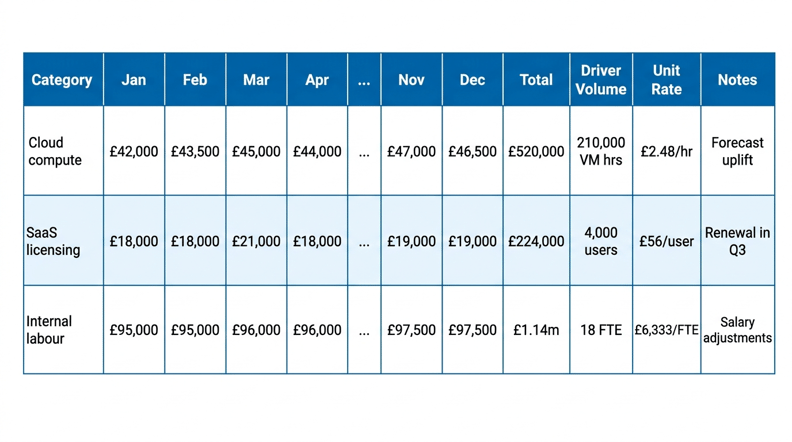
This layout turns budgeting into a clear explanation.
Common mistakes to avoid
1. Treating the planner like a spreadsheet
If your forecast depends on hard-coded cells, hidden tabs, or manual copy/paste, you lose auditability and you can’t reproduce last month’s logic. Spreadsheets also break under versioning (multiple “final” files) and make approvals impossible to enforce.
2. Forecasting Euro/Dollars/Pounds instead of forecasting demand
Forecasting “EuroX for cloud” is guessing. Forecasting VM hours, TB stored, users, tickets, and license counts is planned. If consumption isn’t modelled, variances will be permanent ,and explanations will be weak.
3. Mixing categories that overlap (and then debating definitions)
When “cloud” appears in three places (OPEX, towers, and services), you create double-counting and endless alignment discussions. Start with a clean hierarchy (spend type → accounting → domain/service) and expand only when you can govern it.
Ignoring commitments and renewal timing
Most IT surprises come from what’s already committed: renewals, minimum cloud commitments, outsourcing agreements, maintenance uplifts. If your planner can’t show committed vs variable vs discretionary spend month-by-month, Finance will never trust the forecast.
No tie-out to Finance structures
If cost centers, GL accounts, depreciation rules, capitalization treatment, and labor allocation logic don’t match Finance, you’ll spend every month reconciling instead of steering.
No ownership and no rate governance
Unit rates are powerful—and dangerous. If rate cards have no owner, refresh cadence, approval path, and change log, every forecast discussion becomes political instead of analytical.
See the ITFM Model Behind Budget Planning
IT budgets only make sense when tied to services, drivers, and cost pools. This guide explains how ITFM forms the foundation.
Read nowTo sum up
A strong IT budget planner creates visibility, accountability, and Finance-grade control. When forecasts are built from real demand drivers, mapped to services, and reconciled to GL actuals monthly, budgeting becomes a steering mechanism - not an annual negotiation.
With the right planning layer and governance, you can explain variance as price vs volume vs mix, manage commitments before they surprise you, and give the CIO-CFO partnership a shared model of what IT costs and why. Ready to see what it looks like? Book a demo.
FAQs
What is an IT budget planner?
An operating model and toolset that structures IT spend by service and category, ties costs to measurable demand drivers, and produces a governed month-by-month forecast that can reconcile to Finance actuals.
Why is an IT budget planner better than Excel?
Because it supports driver-based modelling, version control, workflow approvals, audit trails, and repeatable reconciliation—the things spreadsheets struggle with once cloud and SaaS volatility increases.
What inputs does an IT budget planner need?
- GL actuals and commitments (accounts, cost centers, contracts/renewals, depreciation)
- Usage and operational volumes (cloud, SaaS, users/devices, tickets)
- Cost model logic (cost pools, drivers, unit rates, service mappings)
Does an IT budget planner support forecasting?
Yes—through rolling forecasts and scenario modelling. The best planners separate committed vs variable spend and explain forecast changes as price vs volume vs mix.
How does it cut waste?
By making waste visible where it hides: idle or oversized cloud resources, unused SaaS entitlements, duplicate tools across teams, and demand patterns that aren’t governed—so you can act before waste becomes “baseline.”


