


Quick answer: IT Budget format explained
An effective IT budget format organizes costs by service, category, and business driver. It breaks spend into OPEX and CAPEX, maps costs to services and towers, and structures each line item month-by-month for forecasting. The right IT budget format supports allocations, unit rates, and planning workflows inside your IT Budget Planning & Forecasting.
Financial or operational template?
Most IT budgets still follow a financial template, not an operational one. They’re organized the way Finance reports numbers; that’s why traditional budget formats collapse under scrutiny. They hide drivers, bury assumptions, and make year-to-year comparisons almost impossible.
A modern IT budget format fixes that. It standardizes how IT captures costs, links spend to services and business units, and keeps every number tied to a driver or rate inside your IT Financial Management (ITFM) software. When your budget is structured around how IT actually runs, not around a static spreadsheet, forecasting becomes faster, variance explanations become easier, and conversations with Finance become clearer.
This guide outlines exactly how to structure an IT budget format that works at scale, plus a written example you can copy directly.
1. Budget principles: the foundation of the format
Before you define categories or sections, the IT budget format must follow five core principles:
1. Clarity
Every line should have a purpose, an owner, and a driver.
2. Consistency
The format must stay identical year-to-year so trends are traceable.
3. Service alignment
Costs need to map back to services or towers, not vague “IT general” buckets.
4. Driver-based thinking
Numbers must come from consumption, unit rates, or forecasted demand.
5. Month-by-month structure
Annual numbers hide seasonal patterns; monthly views expose the truth.
With these principles in place, the rest of the structure falls naturally into place.
2. Dimensions to include in your IT budget format
Your budget needs multiple dimensions that reflect how IT operates.
By Service
Compute, storage, network, applications, collaboration tools, end-user services.
By Tower
Using TBM-aligned structures (compute, storage, network, end-user, application, security, etc.).
By Business Unit
Demand-based allocation: who consumes what.
By Environment
Production, non-production, development, DR.
A strong budgeting service, like Serviceware’s IT Budget Planning & Forecasting lets you pivot across all four dimensions without rebuilding the model.
3. IT budget categories (the standard structure)
Your IT budget format should always separate costs into clear, predictable categories. These categories will be used for allocations, service P&Ls, and unit-rate calculations later.
Here are the essential IT budget categories:
OPEX
- Cloud services
- SaaS subscriptions
- Support contracts
- Managed services
- Maintenance costs
- Telecoms & networking costs
- Software renewals
CAPEX
- Hardware purchases
- Major infrastructure investments
- Capitalizable software development
- Data center upgrades
Labor
- Internal IT staff
- Contractors
- Project teams
- Service desk personnel
- Security, architecture, engineering roles
Cloud & consumption
- Compute
- Storage
- Network
- Databases
- Serverless workloads
- Container platforms
SaaS
- Productivity suites
- CRM
- ERP
- HRIS
- Licensing tier changes
Network
- Circuits
- Routers, switches
- WAN, LAN, VPN
- Carrier costs
End-user services
- Endpoints
- Device lifecycle
- VDI
- Mobile subscriptions
The budget format should make browsing these categories effortless…that means no scrolling, no merged cells, no “miscellaneous.”

See How Allocation Logic Feeds Your Budget Format
Understanding cost pools and drivers makes budgeting far easier. This guide breaks down allocation rules and how they power unit rates.
4. How the IT budget ties to allocations & unit rates
Your IT budget format must tie directly to:
- Cost pools
- Allocation drivers
- Unit rates
- Service catalogue entries
If a service will be charged back or showbacked — compute, storage, devices, cloud — the budget format is where those rate foundations begin.
Example logic: If storage costs £600k and demand is forecast at 3,000 TB, your budgeting tool should pre-calculate the £200/TB unit rate for next year.
This is why the budget format needs standardized categories: they feed the financial model behind the scenes.
5. The month-by-month layout (the backbone)
A modern IT budget is 12 months of operational reality.
Your structure should include:
- 12 columns for monthly actuals
- 12 columns for monthly forecasts
- Variance columns
- Year-to-date summaries
- Demand / driver columns
- Unit rate references
This exposes seasonal demand (e.g., cloud spikes, device refresh waves, SaaS license realignments) and strengthens your rolling forecast.
Planning & Forecasting with Serviceware handles this automatically, with workflow and versioning included.
Build Forecasts That Actually Hold Up
Rolling forecasts and driver-based models keep IT budgets aligned with real operational demand. This guide explains how.
Read now6. Common mistakes to avoid in your budget format
Too much detail too early
A 400-line budget kills adoption. Start with core services and expand.
Mixing financial and operational categories
Keep towers, cost pools, and GL accounts separate; link them through the tool, not the sheet.
Hard-coding numbers
Drivers should calculate demand, not manual entries.
Not aligning with Finance
Assumptions, depreciation, CAPEX rules, and cost centers must match Finance structures.
Relying on static annual cycles
Cloud and SaaS kill annual planning. Use rolling forecasts.
7. IT budget format example (written template)
Below is a copy-ready layout structured for modern ITFM, TBM, and FinOps reporting.
IT Budget Format – Example Layout
Header Dimensions
- Service: Compute
- Tower: Infrastructure
- Business Unit: Marketing
- Environment: Production
- Owner: “Cloud Engineering”
- Driver: VM Hours
OPEX
- Cloud compute – VM instances
- Cloud storage – block/object
- Database-as-a-service
- SaaS tools (named)
- Support & maintenance
- Managed service provider (MSP) fees
- Network bandwidth & circuits
CAPEX
- Hardware refresh
- Data center equipment
- Capitalized software projects
Labour
- Internal engineering FTE
- Contractors
- Architecture team
- Application team
- Service desk
Monthly Layout Example
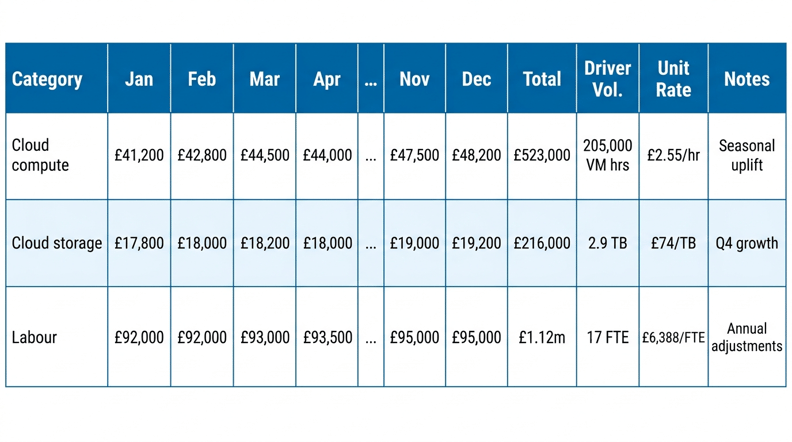
This is an IT budget format that Finance, IT, and the business can all read without translation.
See the ITFM Model Behind Your IT Budget
Budgeting only works when it flows from a clear cost model. This overview of ITFM and TBM shows how services, drivers, and rates connect everything.
Read nowTo sum up
A strong IT budget serves as an operating model. When your categories are clean, your services are defined, and your numbers tie back to drivers and rates, budgets stop being guesses and start becoming management tools. With Serviceware’s ITFM Solution. you get a budget format that’s structured, traceable, and ready for rolling updates.
The right format won’t just help you explain IT costs, it will help you control them. Book your free demo to learn more, today.
FAQs
1. What is an IT budget format?
A structured layout that organizes IT spend by category, service, driver, and month-by-month trends.
2. What should an IT budget include?
OPEX, CAPEX, labour, cloud, SaaS, network, end-user services, and service-level costs.
3. Why is service alignment important?
Because services connect costs to business value and make budgeting more explainable.
4. Should an IT budget be monthly or annual?
Monthly. IT operates on changing consumption patterns, annual numbers hide the truth.
5. How does an IT budget connect to ITFM?
Through cost pools, drivers, unit rates, and service catalog structures within the ITFM Solution.
6. How do budgeting tools help?
They automate drivers, workflows, versioning, and rolling forecasts using Planning & Forecasting.


